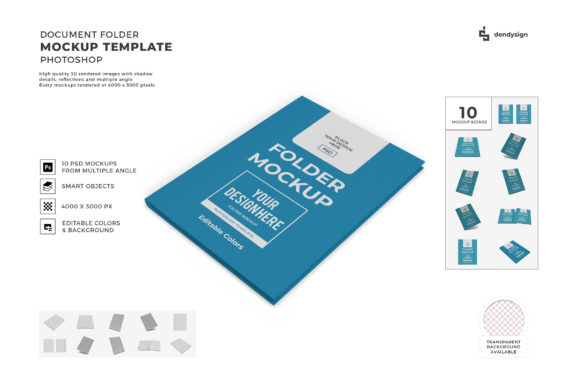
Document Folder Mockup Template Bundle: A Designer’s Time-Saving Tool
Whether you're a graphic designer, marketer, or content creator, showcasing your work in an attractive and professional way is essential. That's where the Document Folder Mockup Template Bundle comes in handy. This collection of Photoshop (PSD) templates allows you to place your designs onto realistic document folder mockups with ease. The bundle includes both 2D and 3D mockup variations, giving you more flexibility when presenting your projects.
What Is the Document Folder Mockup Template Bundle?
The Document Folder Mockup Template Bundle is a set of high-quality graphic templates designed specifically for visualizing printed or digital documents within a realistic folder context. These templates are created in Photoshop format (.psd), which means they are fully editable and customizable. They help you show how your design will look when it's inside a physical folder—perfect for marketing materials, brochures, reports, or any printable content.
Why Use It? Real-World Applications
Imagine you've just finished designing a new brochure for a client. You want to present it as if it were already printed and placed in a folder. Instead of taking photos yourself, you can use these mockups to create a polished presentation quickly. Here are some common use cases:
- Marketing presentations: Show off product catalogs, flyers, or promotional folders in a professional setting.
- Portfolio displays: Add realism to your portfolio by placing your designs into a tangible folder layout.
- Educational materials: Display lesson plans, syllabi, or study guides neatly and visually appealing.
- Small business branding: Present company profiles, service offerings, or event invitations in a cohesive package.
- Bloggers and influencers: Create eye-catching thumbnails or featured images that include mockups of folders containing downloadable content.
Key Features That Make It Stand Out
One of the main reasons professionals love using this bundle is because of its thoughtful features. Let's take a closer look at what makes it so valuable:
High Resolution PSD Files
Every template in the Document Folder Mockup Template Bundle is delivered in high-resolution Photoshop format, ensuring crisp and clear visuals. This is especially important when you need to maintain quality for print or online display.
Easy to Edit
These mockups aren’t just static images—they’re layered PSD files that let you customize every detail. Whether you're changing the background, adjusting lighting, or swapping out the contents, everything is accessible through organized layers. No advanced skills required; just drag and drop your design into the folder area and tweak as needed.
Organized Layers
Thanks to the well-structured layer system, even beginners can navigate the templates without confusion. Each element—folder texture, paper insert, shadows, highlights—is clearly labeled and grouped. This saves time and ensures you don't accidentally disrupt the composition while making changes.
Transparent Backgrounds
Many mockups come with transparent backgrounds, giving you full control over placement. Need to integrate the folder into a website banner, social media post, or app screen? With transparency, you can seamlessly blend your design into any environment. This also makes it easier to match the mockup with your brand colors or project theme.
Beginner-Friendly Examples of Use
If you're new to using mockups, here are some simple examples to get you started:
- Create a mockup of a resume folder to showcase your design services on a website.
- Use the mockup to visualize a training manual or instructional booklet for clients or students.
- Insert a logo or branding guide into the folder to present a cohesive identity package.
- Place a certificate design inside a folder to demonstrate how it would appear in a real-world setting.
Each example shows how versatile and easy to use the templates are. You don't need to be an expert to make them look great—just open the file, replace the placeholder content, and export your final image.
How It Helps Save Time and Improve Presentation Quality
Creating mockups from scratch can be time-consuming. With the Document Folder Mockup Template Bundle, you skip the tedious setup and jump straight into the creative part. The realistic textures and lighting effects are pre-designed, allowing you to focus on your content rather than technical details. This is particularly useful when you have tight deadlines or need to produce multiple variations for different audiences.
Additionally, using a mockup helps avoid the guesswork of how your design will look once printed. Clients and stakeholders can see a lifelike version of the final product, which builds trust and reduces revisions. For freelancers and small businesses, this means smoother communication and faster approvals.
Choosing the Right Mockup for Your Project
Before diving in, it's good to consider a few factors to ensure you select the best mockup for your needs:
- Style: Decide whether you prefer a sleek office folder, a vintage wooden folder, or something more modern like a plastic or leather-bound design.
- Perspective: Choose between flat lay, angled view, or 3D mockups depending on the platform where you'll be displaying the final image.
- Size and resolution: Ensure the mockup matches the dimensions of your actual design for accurate representation.
- Intended use: If you're preparing a print-ready mockup, confirm the file settings support commercial printing standards.
By thinking ahead, you’ll maximize the effectiveness of your mockup and ensure it looks just right in your final output.
Getting Started with the Document Folder 3D Mockup Template Bundle
The 3D variant of the Document Folder Mockup Template Bundle adds depth and dimension to your designs. These templates simulate a three-dimensional space, making your folder appear as though it's sitting on a desk, being opened, or viewed from multiple angles. This level of realism is perfect for creating engaging visuals for websites, ads, or e-commerce listings.
Using the 3D mockups is straightforward. Simply open the PSD file in Adobe Photoshop, locate the smart object layer, and insert your design. The lighting and reflections adjust automatically, maintaining a natural look. You can even modify the background or add subtle effects to enhance the overall feel.
Where Can You Use These Templates?
The applications of the Document Folder Mockup Template Bundle are vast. Here are some popular platforms and industries where these templates shine:
- Web design: Showcase website content packages or downloadable resources with mockups embedded in landing pages.
- Social media: Use mockups for Instagram posts, Pinterest pins, or Facebook banners to highlight your latest design work.
- Print design: Present portfolios, proposals, or marketing kits in a realistic folder format before sending them to print.
- Product photography: Avoid the hassle of photographing physical folders by using digital mockups instead.
- Education and training: Visualize course materials or workshop handouts in a clean, professional folder format.
These templates are incredibly adaptable, making them suitable for both personal and professional use.
Important Things to Consider Before Downloading
While the Document Folder Mockup Template Bundle is a powerful tool, there are a few things to keep in mind:
- Make sure you have Adobe Photoshop installed. While other editing tools may offer limited compatibility, full functionality is available only in Photoshop.
- Review the licensing terms to understand how many times you can use the mockups and for what purposes—commercial or personal.
- Always back up original files before making edits, especially if you're customizing the folder appearance or background.
- Test the mockup on various screens and devices to ensure it looks good across all formats.
Understanding these considerations upfront helps prevent unnecessary rework and keeps your workflow smooth.
Realistic Use Cases for Different Audiences
Let’s break down how various users might benefit from this bundle:
For Small Business Owners
Present your business proposal, marketing plan, or customer testimonials in a realistic folder format to impress investors or clients during meetings. The mockups help you visualize how your printed material will appear in a professional setting.
For Bloggers and Content Creators
When offering free PDF downloads or printable templates, a mockup of a folder holding your content can increase perceived value. It gives visitors a sneak peek of what they'll receive, encouraging sign-ups and engagement.
For Educators and Trainers
Display lesson outlines, student handouts, or certification programs in a structured folder format. This not only looks professional but also helps organize your content visually for better comprehension.
For Marketing Professionals
Include mockups in email campaigns, web banners, or ad creatives to show how your marketing collateral fits into a branded folder. This enhances the visual appeal and conveys professionalism instantly.
Final Thoughts on the Value of Mockups
In today’s fast-paced digital world, first impressions matter. The Document Folder Mockup Template Bundle offers a quick and effective way to elevate your design presentations. With high-resolution files, easy customization, and realistic rendering, it's no wonder that so many designers rely on these templates for their projects.
Whether you're working on a solo project or collaborating with clients, having access to a variety of folder mockups can streamline your workflow and improve your results. The next time you need to showcase a document-based design, remember that a well-placed mockup can speak volumes.
Ready to Elevate Your Designs?
Don’t miss the opportunity to bring your ideas to life with the Document Folder 3D Mockup Template Bundle. Its combination of practicality, realism, and user-friendly design makes it an invaluable addition to any creative toolkit. So go ahead—download now and start experimenting with high-quality, easy-to-edit mockups that help you stand out in any project.